AI PDF translator: scanned Lao to English
Translate scanned or digital Lao PDFs into English with your coding agent: text, tables and maps in the original layout, plus a list of what to check.
Give your coding agent a PDF in Lao, scanned or digital, and get it back in English on the original pages, with a short list of what a person should still check. Small subagents translate it a section at a time, and text inside maps and charts is redrawn in English the way Google Lens does it.
Links
-
ai-pdf-translator, the tool (open source): github.com/andreadorizza/ai-pdf-translator
-
Claude Code: code.claude.com/docs
-
Codex: developers.openai.com/codex
-
OpenCode: opencode.ai
-
uv, to install the tool: docs.astral.sh/uv
-
PDFMathTranslate, the layout engine underneath: github.com/PDFMathTranslate/PDFMathTranslate
-
Tesseract, the OCR for scanned pages: github.com/tesseract-ocr/tesseract
What you need
-
A coding agent: Claude Code, Codex or OpenCode, on your own plan or API key. So far only Claude Code has been tested.
-
A Mac or a Linux computer. Windows is not tested yet.
-
uv. The agent installs the rest the first time: the tool, Tesseract with its Lao models, and a layout model.
Step 1 · Install
In Claude Code, run these two commands, then open a new session:
/plugin marketplace add andreadorizza/ai-pdf-translator
/plugin install ai-pdf-translator@ai-pdf-translator
In Codex or OpenCode, run these in a terminal, in the folder where you work:
uv tool install git+https://github.com/andreadorizza/ai-pdf-translator
ai-pdf-translator install-skill
The first time you use it, the agent runs a setup check and asks before installing Tesseract.
Step 2 · Translate a PDF
Ask your agent:
Translate report.pdf into English with ai-pdf-translator.The agent reads the pages, starts subagents that translate the document a section at a time with one shared list of terms, has another subagent check doubtful paragraphs against an image of the page, then builds the PDF. In a folder next to your PDF you get the English PDF, a bilingual PDF, the review list, and the text as Markdown: the original, the English, and both together paragraph by paragraph, with tables as tables.
It also translates table cells, chart labels and running headers. For text inside pictures, such as map legends, it works like Google Lens: it finds every label, a subagent reads it from a zoomed crop, and the label is erased from the picture and redrawn in English.
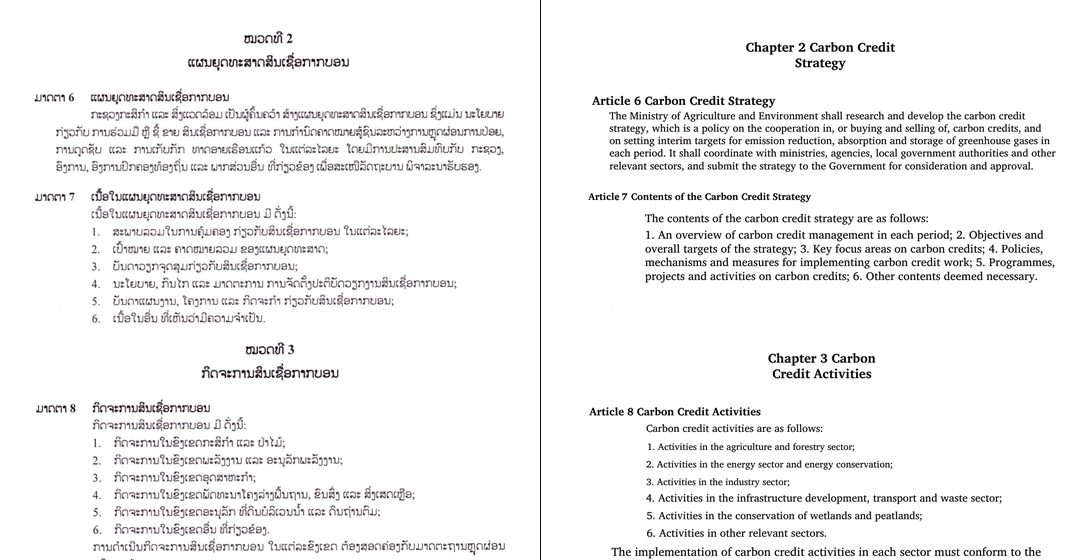
A scanned page of a Lao decree (left) and the same page in English, made by ai-pdf-translator
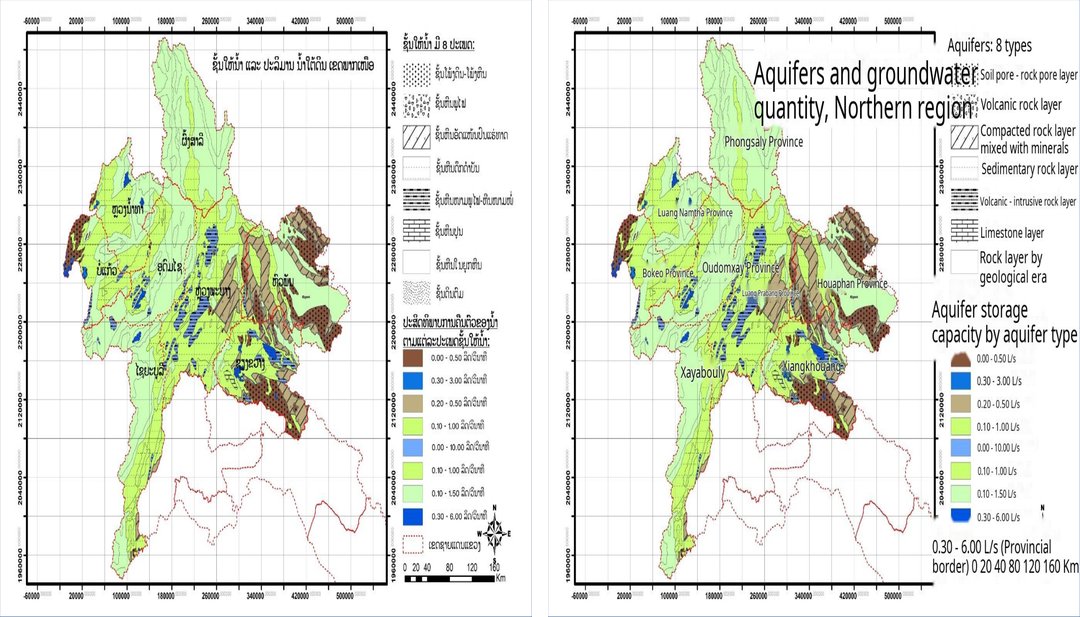
A map from a Lao government report (left) and the same map after ai-pdf-translator: labels erased and redrawn in English
Our 85-page test report, with 22 maps and charts, took about half an hour of processing and cost roughly $2–3 at API prices, most of it for reading the pictures and checking doubtful passages. On a Claude plan it uses your usage limits and costs nothing extra.
Step 3 · Check the review list
The review list (review.md) holds what a person should verify: figures in the source that the English lacks, passages the checker could not read, doubts the translator raised, and labels in pictures it could only guess. Go through it with your agent:
Go through the ai-pdf-translator review list with me, one item at a time.Tell it each correction. It rebuilds the PDF with your fixes, and no model runs again.
How good is it?
On a scanned Lao decree that has a human English version, the tool scored chrF++ 66 against that English and got all 218 figures right. PDFMathTranslate with Google Translate scored 52–55 on the same pages. To test your own setup on that decree, ask your agent:
Run the ai-pdf-translator self-test.It prints pass or fail, the score and the figures matched.
What it does not do yet
-
In pictures, the smallest labels on a crowded map can be missed and stay in the original language.
-
Pictures that are layers of a designed page, such as a cover, are left as they are.
-
Only Lao is tested. Other languages need a language profile and are experimental.
-
Codex, OpenCode and Windows are not tested yet. Problems and ideas go in the GitHub issues.